Home← All WorkContact
04

Surface
Calculator

Computation · AI Code · UX Design · Rhino Tool

A purpose-built desktop tool embedded inside Rhinoceros 8 that automates facade area analysis — engineered as a single Python 3 file (~3,600 lines) with no plugins required.

Year
2026 — Present
Status
Development
Location
Berlin, Germany
Type
Computation · AI Code · UX/UI
Built with
Python 3 · RhinoCommon · WinForms · GDI+ · Grasshopper · Claude AI
Live Tool · Video Walkthrough
Try it — or watch it in action
Open full screen ↗
Live Tool — Interact
Video Walkthrough
Interactive — select surfaces, assign openings, export to CSV / PDF / JSON Open in new tab ↗

The
ProblemWhy it was built

Calculating facade areas in early design stages is a slow, error-prone manual process. Architects typically export geometry to spreadsheets, count openings by hand, and repeat the entire workflow every time the model changes. There was no tool that lived inside the modelling environment and understood the relationship between a facade surface and its windows or doors.

This tool solves that entirely — it lives inside Rhino 8, reads the geometry directly, and produces a complete, accurate area schedule in seconds.

Key
FeaturesWhat it does

Surface Queue
Drag-and-assign hierarchy. Any surface can become an opening of another via right-click context menu, with multi-select support.
Live 2D Diagram
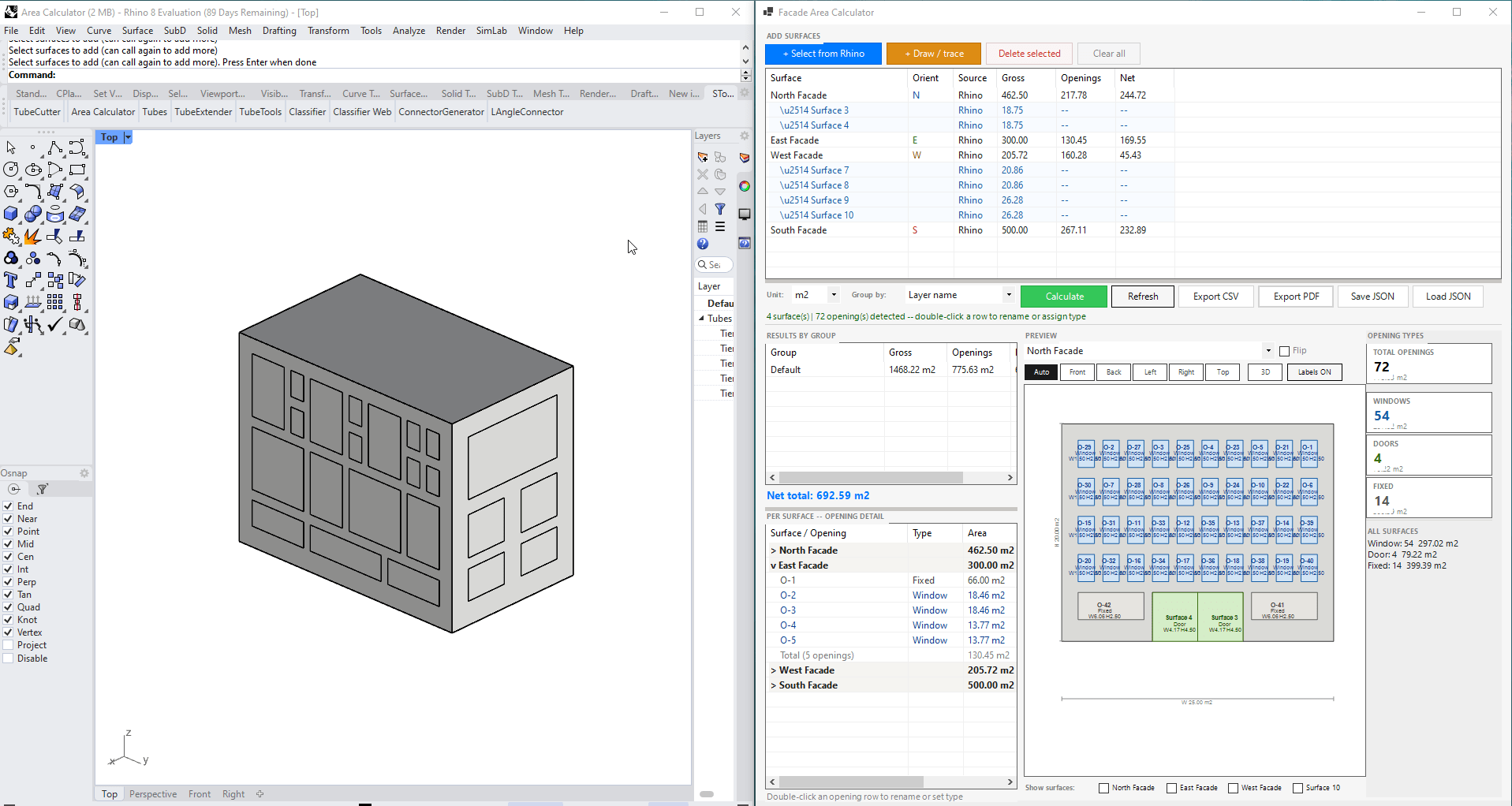
Each facade renders as a scaled elevation with openings drawn to scale. Auto, Front, Back, Left, Right, Top and 3D orbit views. Per-surface local plane.
Type Tracking
Each opening is classified as Window, Door, or Fixed. Stat cards show totals by type. Types and custom names survive recalculation.
Geometry Detection
Inner BrepLoop holes are detected automatically as openings. Traced polylines are closed, planarised, and BooleanDifference'd in memory.
Session Persistence
Full session serialisation to JSON — geometry, names, types, orientations and results reload without the original Rhino model.
Multi-Format Export
One-click export to CSV (group + opening detail), PDF (summary + per-surface diagram pages), and JSON for session save/load.
~90%
Reduction in time vs manual method
3
Export formats — CSV, PDF, JSON
0
Plugins required — pure Python 3

Technical
DepthHow it's built

The tool is engineered as a single ~3,600-line Python 3 (CPython) file using RhinoCommon and WinForms — no plugins required. It runs both as a Grasshopper CPython component (Boolean Toggle input) and as a standalone Rhino script via _RunPythonScript — same codebase, same UI.

Geometry Engine
Custom plane fitting per BrepFace using world-up cross-product to guarantee a stable UV coordinate system. All 2D projections are consistent regardless of surface orientation in 3D space.
UI Architecture
WinForms with a custom DiagramPanel (GDI+ zoom/pan, hit-testing, hover highlights) and a View3DPanel (orthographic orbit, painter-sort rendering).
Data Model
A surface queue dict stores GUID, source, parent index, cached result, pre-computed 2D points, orientation, flip flags, and centroid — enabling both live Rhino and offline JSON workflows.
Dual Entry Point
Runs as a Grasshopper CPython component or as a standalone Rhino script — same codebase, same UI, IronPython compatible.
Tool Interface — Rhino to Elevation
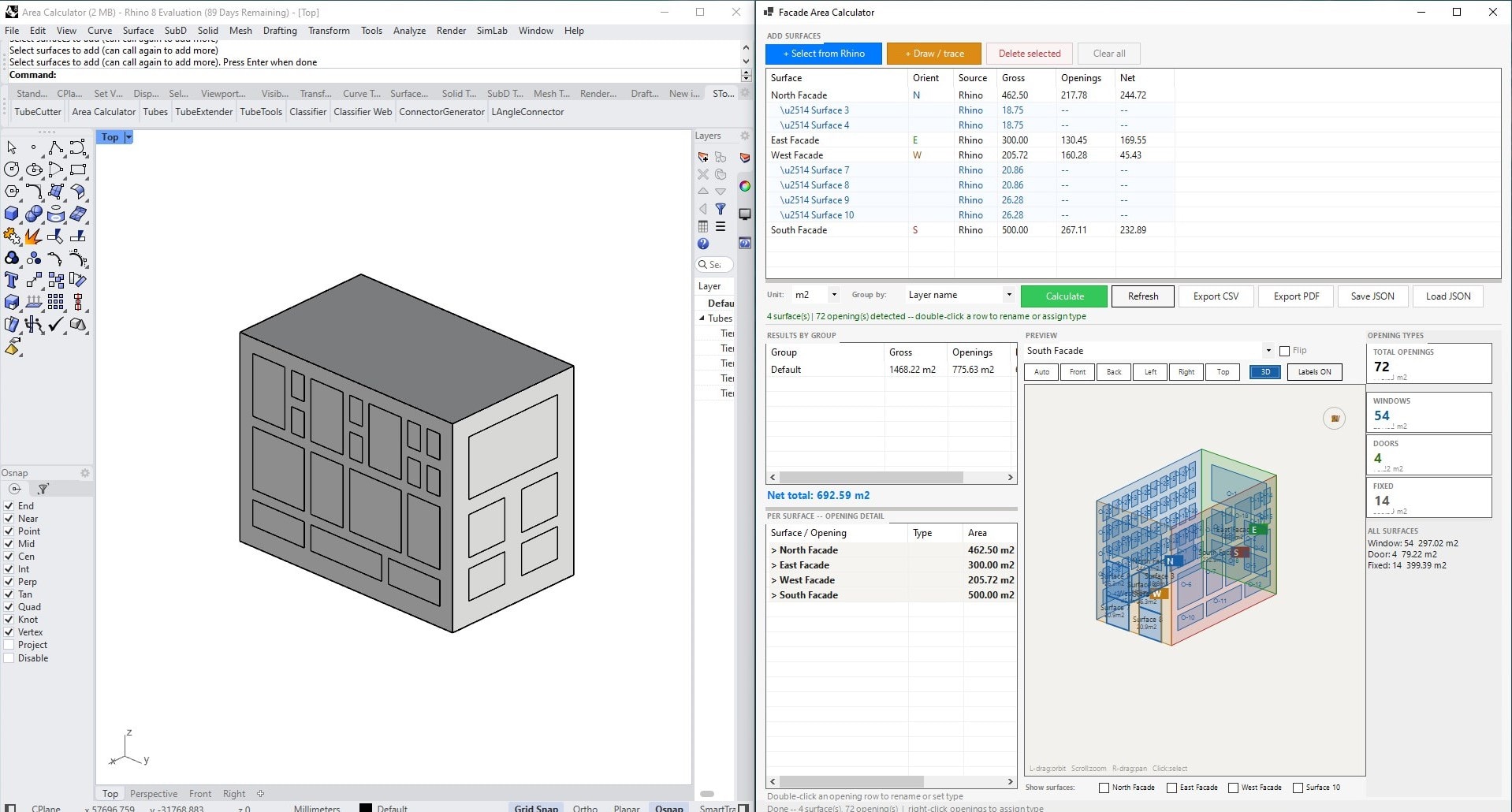
Tool Interface - Rhino to 3D
Tool Interface — Rhino to 3D
Stack Python 3 (CPython) Rhinoceros 8 Grasshopper RhinoCommon System.Windows.Forms System.Drawing (GDI+) IronPython Compatible Claude Code AI
Tags ComputationFacade PythonRhino AI CodeUX/UI Excel ExportBerlin
← Previous
Facade Analysis Tool
Next →
Surface Model Analysis