
Input — 2D Line Axis Drawing
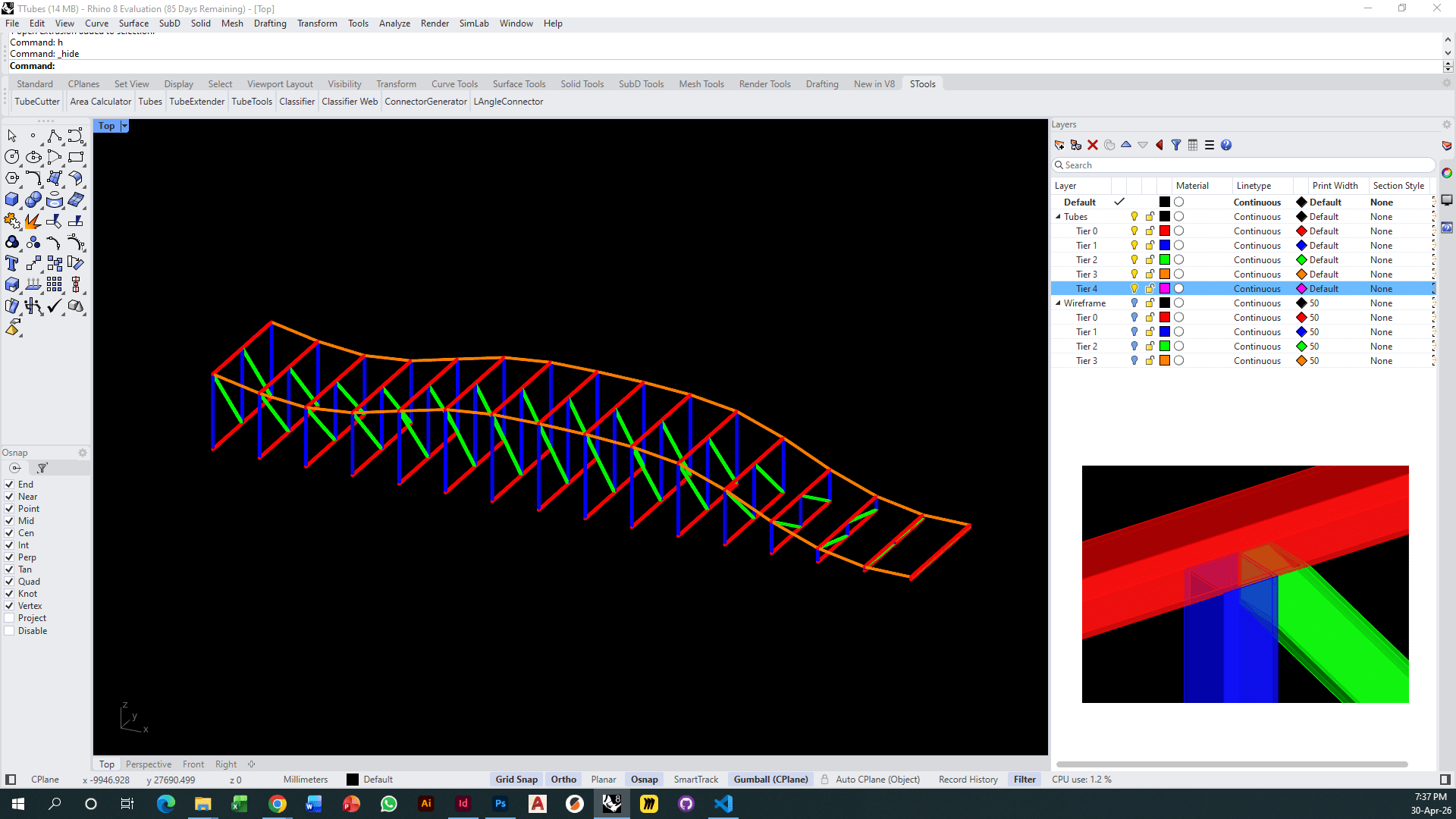
Output — 3D Tubes Generated
A two-part parametric system — from a single roof surface to fabrication-ready 3D tubes. Part one generates a full colour-coded substructure wireframe from surface input alone. Part two reads that wireframe and produces tubes, profiles, and cuttings — running as both a standalone Rhino tool and a direct Grasshopper workflow.
System Tubes is a multi-function parametric toolkit with a wide range of inputs and outputs. Starting from nothing but a roof surface, it produces fabrication-ready 3D tube geometry through a two-stage pipeline — each stage capable of running independently or chained together as a single end-to-end Grasshopper workflow.
The two tools are designed to work in tandem: the Substructure Wireframe Generator produces the colour-coded layer output that the Tube Generator consumes directly. This means the entire process — from surface to cut tubes — can run parametrically in one GH canvas, updating live as parameters change.
The Substructure Wireframe Generator is a Grasshopper Python script that takes a single roof surface as its only input. From that surface, it computes a full structural substructure below it — driven entirely by parameters set directly in the GH canvas.
The user controls the number of stiffeners across the surface and the type of bracing applied between them. The script outputs the complete wireframe geometry, sorted and colour-coded into the layer hierarchy used by the Tube Generator — making it directly connectable as the first stage of a full end-to-end GH pipeline.
The Tube Generator reads the colour-coded wireframe — whether produced by Part 01 or drawn manually by the 2D team — and converts it into fully resolved 3D tube geometry. It operates in two environments: as a toolbar button inside Rhino for standalone use, and as a GH component that connects directly to Part 01's output for a fully parametric pipeline.
Presets define the rules — which colour maps to which tube type, profile dimensions, and the hierarchy of cuts at intersections. These presets can be saved and reloaded, making the tool consistent and repeatable across different projects and configurations.
This tool is developed to be used both in Rhino and in Grasshopper. Inside Rhino, the tool has its own toolbar with standalone functions as well as the whole process together. You set a preset of rules — colours, types, hierarchy of cuts — and these rules can be saved and loaded when needed.
